See Your Whole Water System in One Place — and Put AI to Work on It
ClearWater brings your tank levels, well readings, and water meters together on one simple screen — so nobody has to log into three different systems just to see what's going on. Then ask it a plain-English question and get a real answer, sourced from your own data.
Your Tanks and Wells
Comes from your Mission SCADA system — the same equipment you already use.
Your Water Meters
Comes from your Badger BEACON meters — reads leaks and usage automatically.
Keep an Eye on Your Tanks, Wells, and Water Quality
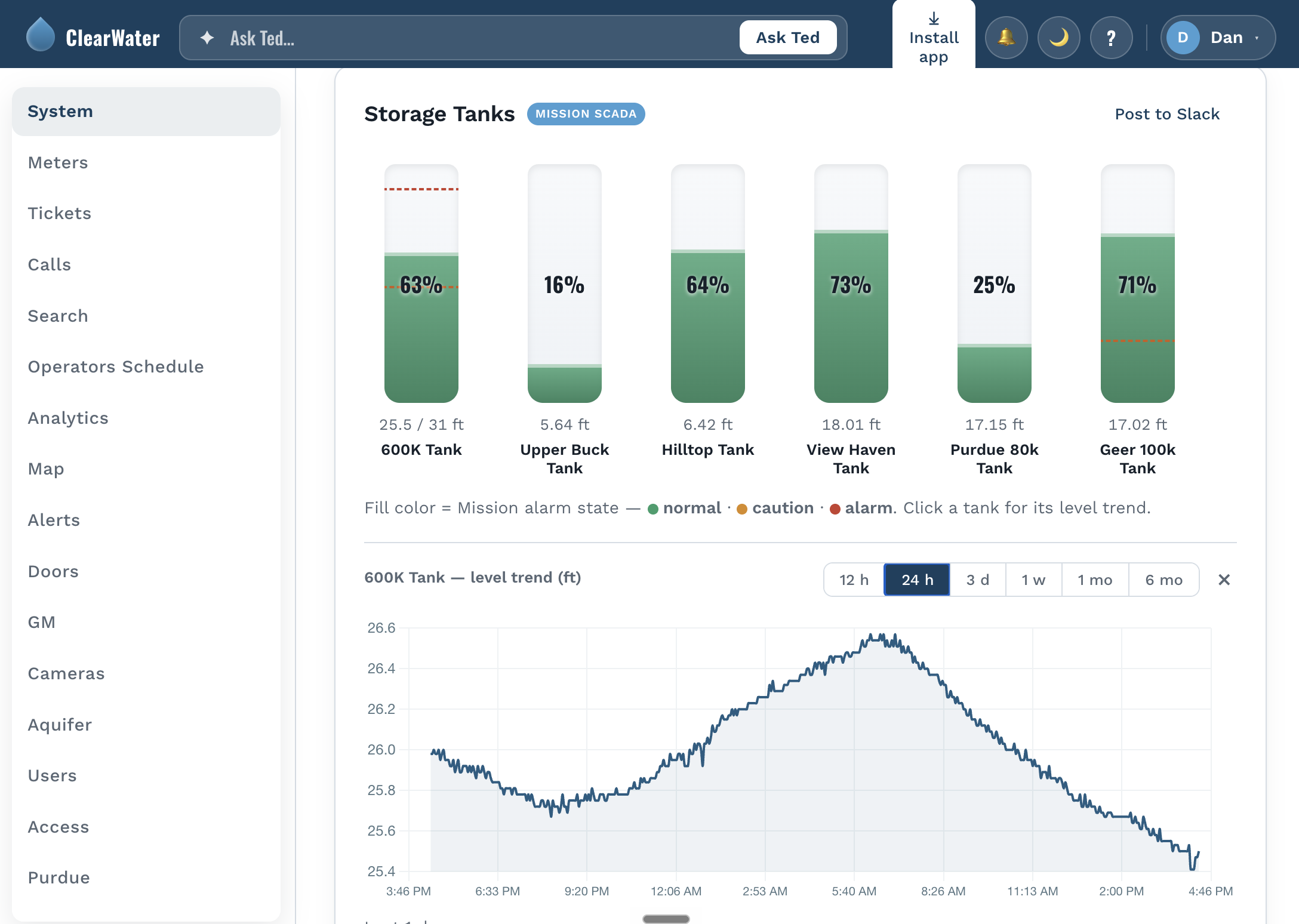
Right now, checking your system means logging into Mission and clicking through screen after screen. ClearWater puts every tank level, every well, and every water-quality reading — chlorine, turbidity, pH — on one simple page instead.
It reads your Mission system quietly in the background, about once every three minutes. There's nothing new to install, and it doesn't slow anything down.
- 1Warns you about a fast-dropping tank — and it's smart enough to tell a real drop from a sensor acting up, so you're not chasing false alarms.
- 2Uses names your operators already know — not confusing serial numbers and equipment codes.
- 3Keeps the history you need for reports — peak-day demand and system usage, ready for your Water System Plan.
A tank dropping fast at two in the morning doesn't wait for the next shift. ClearWater watches around the clock and sends a Slack message and an email the moment something looks wrong — before it becomes an emergency.
Catch Leaks Before They Become a Problem
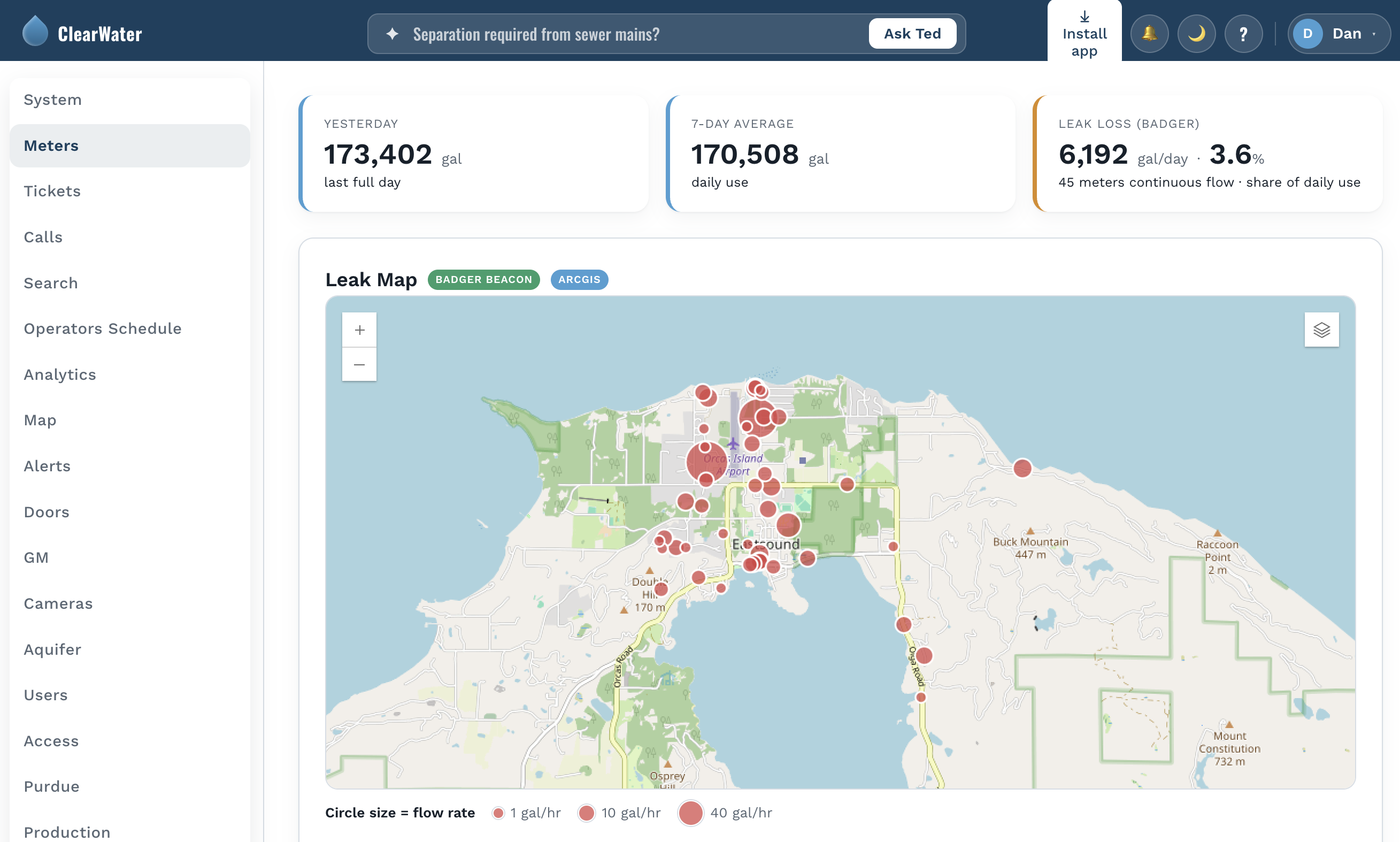
Your meter system tells you what every single meter did. What it doesn't do is tell you which of those readings actually need your attention today. ClearWater sorts through it for you: a genuine, ongoing leak gets flagged right away, while everything smaller and slower goes into one easy morning summary instead of a flood of alerts all afternoon.
A meter running backward, or the whole system using noticeably more water than usual, gets caught the same day — not weeks later at billing time.
- 1Tracks water loss against your own production numbers every month, instead of a once-a-year estimate.
- 2Shows your top water users automatically, so it's ready before the board meeting, not pulled together the night before.
- 3Remembers each meter's history — so "has this happened before?" is a quick look-up, not a guess.
A meter that's been leaking quietly for months doesn't need to interrupt anyone's afternoon — it just needs to be on tomorrow's list. ClearWater is already set up to make that call for you.
One Picture, Not Six Separate Logins
Each of your systems tells you its own small piece of the story. Put together, they tell you things you'd never notice looking at any one of them alone. ClearWater already does this in a few places — it lines up raw water quality, plant flow, and weather on the same timeline and works out which ones move together, so a rise in manganese or turbidity doesn't look random anymore. It's tied to the season, the rainfall, or how hard the plant has been running. The same idea applies to your aquifer level, checked against rainfall and how much water was used, year over year.
- 1Finds the connections for you — like a water-quality reading that only makes sense once you see it next to the weather.
- 2Puts your aquifer, rainfall, and usage on one timeline — so a dry year and a heavy-use year are easy to tell apart.
- 3Saves you from stitching it together by hand — no more pulling three reports to answer one question.
A number on its own can be hard to explain to a board. A number that's clearly tied to the weather, or to how much water people used that month, tells its own story.
You Find Out the Moment It Matters — You Don't Have to Go Looking
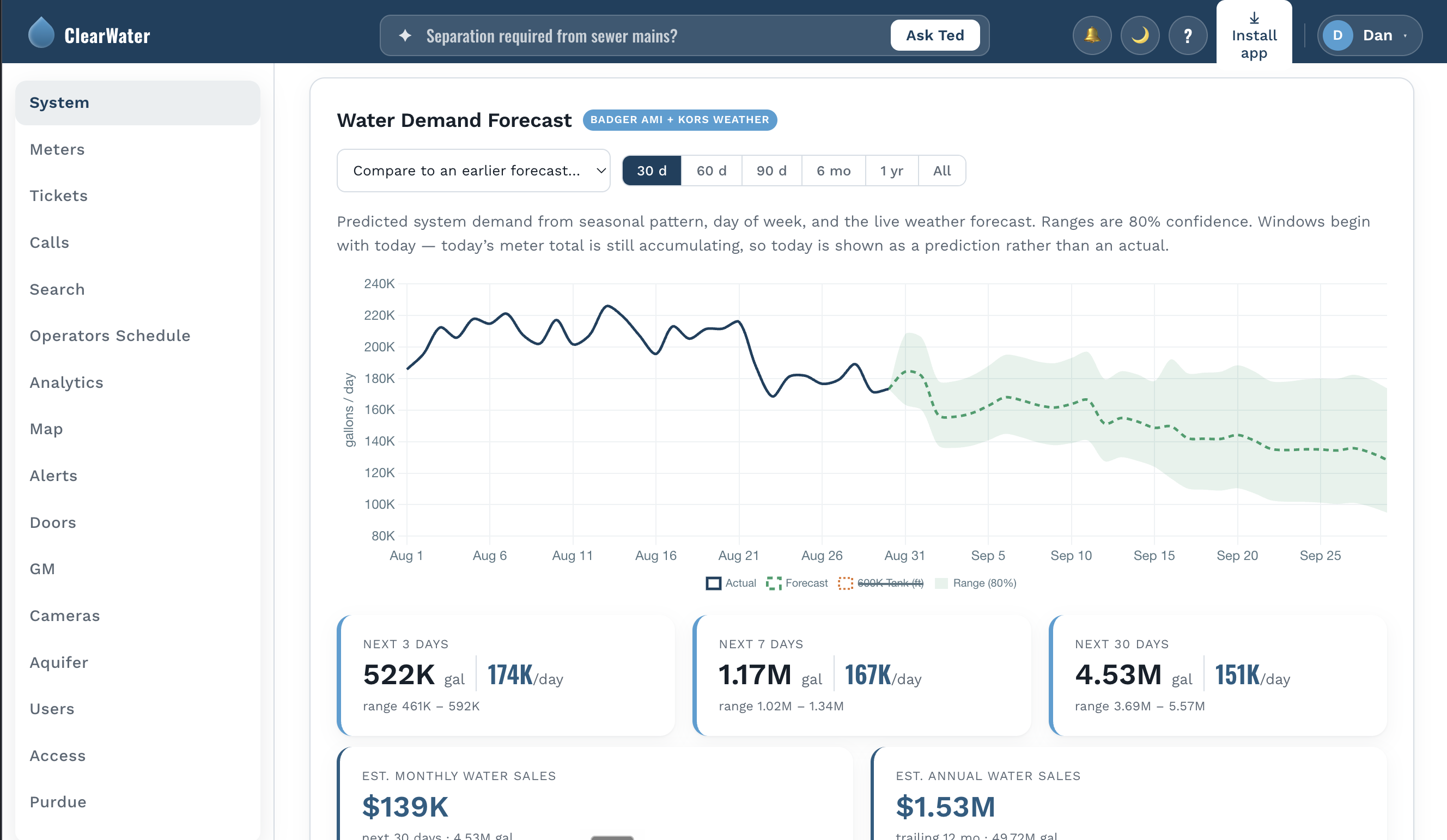
Every alert ClearWater sends — a tank falling fast, a meter leaking, water quality drifting out of range, an unusual spike in system-wide use — goes straight to Slack and email, the same places your team already checks, including on their phones. Anything smaller gets rolled into a single daily summary instead of a flood of separate pings, so the alerts that do interrupt your day are ones actually worth interrupting your day for.
- 1Real problems, right away — tank drops, leaks, backflow, and water-quality alerts fire the moment something looks genuinely wrong.
- 2One summary each morning — everything smaller, rolled up so nothing quietly falls through the cracks.
- 3Sent where you'll actually see it — Slack and email, both already on your phone.
See What's Coming, Not Just What Already Happened
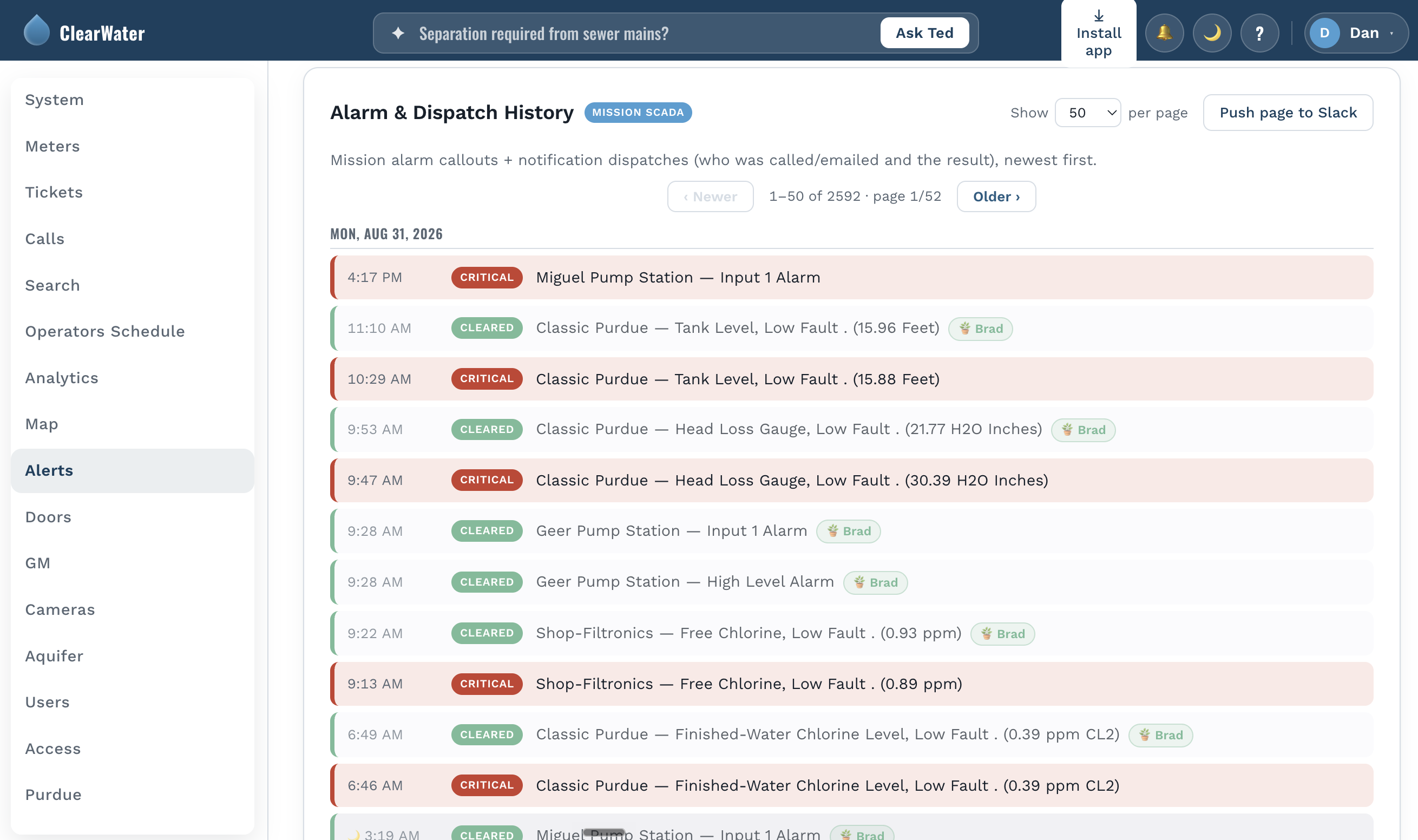
ClearWater doesn't just store your history — it uses it. Water demand is forecast days ahead, built from your own usage patterns together with the weather forecast, so a hot weekend or a cold snap doesn't catch you off guard. And because ClearWater checks its own forecasts against what actually happened, you can see exactly how reliable those predictions have been — not just take our word for it.
- 1Demand forecasting — days-ahead predictions built from your own consumption history and the weather forecast together.
- 2A track record you can check — every forecast is measured against what actually happened, so its accuracy is right there, not just claimed.
- 3Years of trends at a glance — peak-day demand, aquifer levels, and water loss, compared year over year instead of dug out of old reports.
Ask a Plain Question, Get a Straight Answer
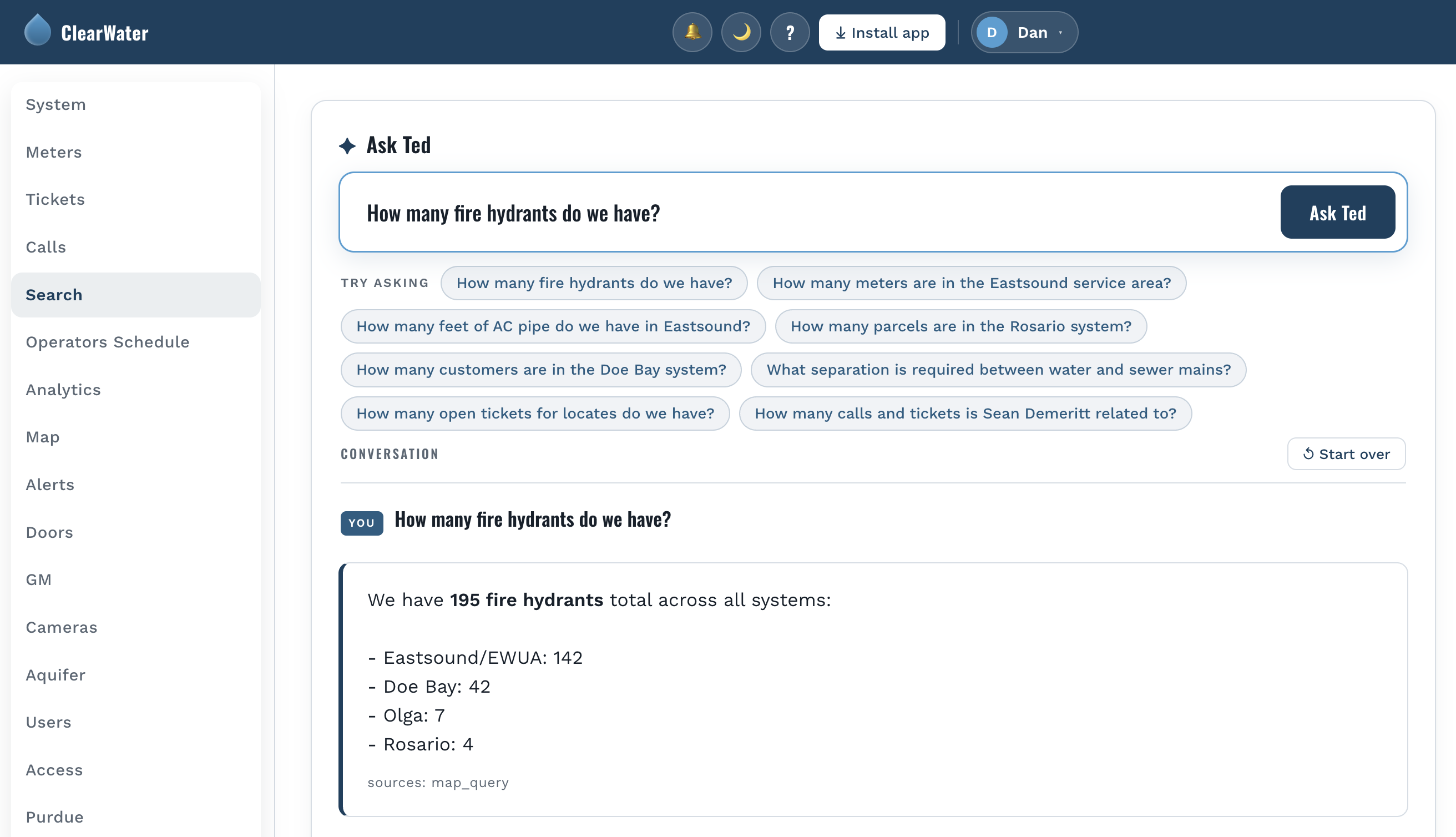
Not everyone on your team wants to build a report or hunt through a spreadsheet to answer a simple question. With ClearWater, you can just ask — in plain English — and get a real answer pulled straight from your own system's data, not a canned response written ahead of time.
Ask how this July's production compares to last year's, which meters have been flagged for leaks recently, or what the aquifer trend has looked like over the last five years, and get an answer in seconds, sourced from the same data everything else on this page comes from.
It's like having a staff member who already knows your system inside and out, and never minds being asked one more question.
Your Board Stays Informed Without Logging into Anything
Most board members don't want a login. They want to know the system is being run well, and they want it in a form they can read on a phone before a meeting. ClearWater sends them a summary every week on its own, drawn from the same numbers the operators work from — so the board and the staff are never looking at two different versions of the month.
For the people who do want to look, there's a board view: the tanks, the aquifer, production and the map, without any of the entry screens or compliance paperwork. Staff see what they need to do their jobs; directors see the picture. Nobody has to be trained on something they'll open four times a year.
- 1One email, every Friday morning — storage, usage, demand, revenue and the week's calls and tickets, already written up.
- 2Built from the live system, not typed up by hand — nobody spends Thursday night assembling it, and the figures match what's on the screen.
- 3A read-only board view for anyone who wants more — the same data, without the operating controls.
Esteemed Directors, below are the key performance indicators for the EWUA systems and the company at large over the past week. This automated report will generate every Friday at 9:00 am. Please reach out to me with any questions.
An example of the Friday email. Water users are shown by account type rather than by name, and the figures here are representative.
A board that only hears from the utility when something has gone wrong has no way to judge whether things are going right. A short, regular note — the same shape every week, built from the system itself — turns the water system into something the board can actually govern.
Other Tools It Can Connect to, If You Want It To
Your tanks, your water meters, the alerts, the forecasting, and the AI assistant are the heart of it. Everything below is optional — turn on only the tools your utility already uses.
Customer Service Tickets
Service requests shown right next to the meter or address they're about.
Phone Call Records
See who called and when, alongside everything else on that account.
Building & Gate Access
Know when a site or gate was accessed, in the same place as your other records.
Document Search
Find permits, reports, and past records without leaving the page.
Member Email Newsletters
See how your outreach emails are doing, next to the system data behind them.
Website Visitors
See when your public website gets busy — often a sign something needs attention.
Property Mapping
See parcels and meter locations on a real map, not a list of addresses.
None of this is required to use ClearWater, and none of it sees your information unless you turn it on.
Built for, and Used Every Day by, Eastsound Water Users Association on Orcas Island
This isn't a mock-up. It's the same system EWUA's own staff rely on to run their water system — lake plant, wells, tanks, and meters, every day.
See Your Own System on One Screen.
Send us what you already have from Mission and BEACON, and we'll show you what ClearWater does with it — your real data, not a sample.
info@clearwaterapp.comClicking that should open your email program with our address already filled in. If nothing happens, no problem — just open your own email and send a note to info@clearwaterapp.com directly.